Four years ago, my journey as a Software Engineering student at the University of Waterloo began. I still remember back then when the tech giants were referred to as the “Big Four”. Freshmen like myself had a common dream to work at a big tech company after graduation. From then on, I studied the basics of software development in school, made my first ever resume and grinded Leetcode before interviews. This is where I began my adventure into the job search market.
Through all of that, I spent my time programming in various languages and environments. There is however one thing that was always present during my whole path.It was to work at a tech giant. When given the opportunity to have an internship at Google, I was on cloud nine! In retrospect, I have thoroughly enjoyed the experience.
Today, I’m writing this post in order to document about everything I worked on during my internship, but also to give some insights on the opportunities that interns get.
1. Chromium
Chromium is a huge open source project, mostly known as the source code behind the Google Chrome browser and the Google Chrome OS.
For the past three months, I’ve been working with an incredible team at Google on Chromium. During this time, due to COVID-19, I worked remotely from Montreal. It was an interesting and unique experience which I’ll develop further towards the end of this post.
If there is one thing that I absolutely have to mention about working on Chromium is that this project lets you see the effects of what you’ve done very rapidly. Every 6 weeks new features get shipped, which means, for an intern, that we have the ability of shipping out our feature before our internship ends! Also, did you know there are a total of 4 versions of Google Chrome? I didn’t know either until I started working on it. Firstly there is Chrome Stable that most people use, more widely known as just Google Chrome. Then, there is Chrome Beta and Chrome Dev, which receives more frequent updates through the cost of a, perhaps, less stable build. Finally, the most impressive version to me was Chrome Canary. This version of Chrome receives updates daily. Literally all the code I wrote and pushed to the master branch of Chromium would appear on Chrome Canary the next day!
1.1. The Catan team
For my internship at Google, I’ve been welcomed by the Chrome Catan team. This is a team located in the Montreal, Canada office and consists of around 10 people. The team’s main responsibility is to improve the performance all around Chrome. Often, this would be done by finding and fixing the element causing the performance delay, or sometimes, simply by reducing the code complexity. To be completely honest, I’ve known my coworkers more for their foosball skills than their coding domain…
1.2 My role as an intern
The main focus of my internship was the Performance Manager(PM); a module that was created by a few people on the Catan team a long time before I arrived. It was still some new stuff inside Chromium and needed a couple of extra hands (me) to work on it.
The PM is a centralized resource management system for Chromium. Here is an overview architecture image from the Chromium code base:
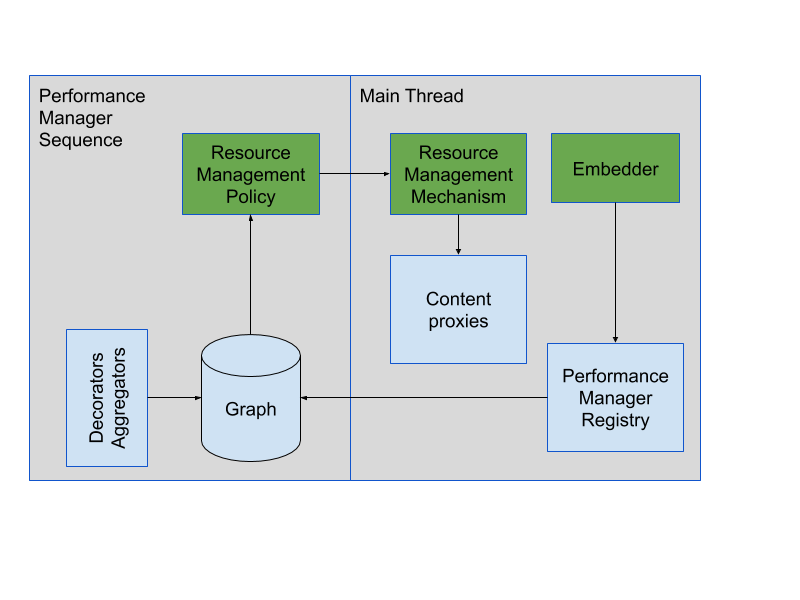
The graph is a simplified model of the stats of the Browser exposed through the PM sequence. This is something that’s easier to try out and see than for me to explain it. Go ahead and navigate to chrome://discards and play around with the graph view!
I also spent a large amount of time writing a design doc prior to coding my intern project. In addition, time was also spent on refactoring the code I wrote and writing even more tests than the basic unit testing in order to ensure proper test coverage, but all of these are less interesting to mention since the main part is really the bigger project.
2. Background Tab Loading
Before talking about background tab loading, I need to first explain session restore. Session restore is a feature in Chromium that allows restoration of a set of closed tabs. To most people, it is mostly known via the “Continue where I left off” startup option inside Google Chrome. It can also be triggered in other circumstances such as a prompt after a browser crash.
During my internship, I was given the responsibility of rewriting how the background loading logic of tabs was done when a session restore happens. Analyzing the current approach of the code logic, I came up with a redesigned and better approach to handle this use case.
2.1. Design constraints
There are a few constraints already defined for how background tab loading should work:
- The number of tabs loading at the same time (loading slots) must be dependent on the computer system’s resources; such as number of cores, available memory and battery percentage (when applicable).
- The content visibility must be tracked at all time and content should be immediately loaded when it becomes visible.
- Timeouts should be imposed on each loading tab.
- Maximum and minimum threshold must be imposed on the total number of tabs restored.
- The order of which tabs are restored must be determined by user expected utility. This will take into account factors such as background communication, user engagement, the expected amount of time before the user visits the tab… etc.
In addition to the base constraint, there are also a few optional possible development ideas that we would like to implement to make the session restore implementation even better for the users…
In a followup to constraint #2, we would like to be aware of foreground user interaction and react accordingly. Currently, the user might experience a slow down in their foreground tab when a large number of background tabs are loading at the same time. This is caused due to the fact that the maximum simultaneous loading slots threshold does not take into account the user’s interaction. Since we are not able to stop a loading tab once the loading has already begun, constraint #2 would possibly overload the maximum loading slots.
2.2. Approach #1: TabLoader
The existing code presented us with a class named TabLoader which lives on the main thread. When a session restore happens, tabs to be restored are created on that main thread and then passed to TabLoader in order to start the restoration.
The first constraint is enforced in the TabLoader class’ code logic. The number of loading slots is calculated using the number of system cores and the amount of available memory on the system. Similarly, the content visibility, the timeouts, and the threshold are addressed in the same manner and the logic lives inside TabLoader class.
However, when it comes to constraint #5, TabLoader would make a call to another class named SessionRestorePolicy in order to give a prioritization score to each tab and sort them accordingly.
Not to mention, TabLoader also needs to communicate with the PM in order to request the loading state of each tab. The PM then passes the information to TabLoader through a class named PageLoadTracker. This is an action performed cross thread as the PM runs on the PM thread while the TabLoader and PageLoadTracker runs on the main thread.
Although all constraints seem to be met, there are a few downsides to this approach…
First of all, TabLoader communicates with multiple additional classes in order to get the session restore done. In addition, TabLoader also makes frequent cross-thread communication with the PM in order to get the needed data for restoration. All thoses communication and the extra classes involved makes TabLoader more complicated than it should. The complexity of TabLoader also makes it hard to experiment with it and reduce the potential for additional functionalities.
Furthermore, TabLoader class can only handle background tab loading when a session restore occurs. Different kinds of background tab loading, such as when a link is opened in the background via the right click of the mouse, is handled by different classes.
2.3. Approach #2: BackgroundTabLoadingPolicy
My proposed approach is implementing TabLoader as a policy that lives inside the PM graph. Of course, it would also mean that this policy will be run from the PM thread. When a session restore happens, tabs to be restored will be created on the main thread once again, but will then be passed to the PM thread and translated into PageNodes (PageNodes on the PM thread corresponds to tabs on the main thread).
The number of loading slots will be calculated in a similar way as the TabLoader. Since timeout is already handled by the PageNode class itself, we would be able reduce the code complexity by removing the code needed to satisfy constraint #3.
Besides that, we will be able to refactor the logic for the calculation of the tab’s utility score to be much simpler than currently implemented. As this code logic has been enhanced multiple times, there are unused parts that will highly benefit from the refactoring.
Moreover, all data needed for the session restore can be found inside the PM. By moving this policy to the PM framework, we are able to write well-defined mechanisms to exchange information between all PM policies and thus, facilitating communication within the PM. Since we will mostly be communicating within the PM thread, we could reduce the complexity and the frequency of cross-thread communication.
On top of that, Implementing background tab loading inside the Performance Manager policy would potentially allow all types of background loading to be handled using the same logic as tab freezing (and other page management functionalities) are already implemented inside the PM.
Extras
The main project took me the bigger half of my 12 weeks internship. I can however now proudly say that I completed what was expected of me and have sent it into A/B testing.
Aside from it, I was given the possibility to work on different parts of Chromium. I’ve touched quickly tasks such as tracings (can be viewed via chrome://tracing), histograms (chrome://histograms), and a few things inside contents (the core code of Chromium as a browser); renderer, frame views, etc.
Working From Home
My internship at Google has now ended and I’ve already talked about the main project I worked on. This was my first and probably my only internship working from home most of the time, away from the team. I guess it worked out alright!
One of my coworkers, and I quote, said: “We expect people to be less productive while working from home.” It is true that working remotely came with a significant increase in autonomy responsibilities, but I don’t think this necessarily has a big impact on productivity. At least for me, I can confidently say that I am as productive working from home as I would be in the office. As a side note, I absolutely loved saving the time commuting in order to enjoy my breakfast or simply get out of bed a little later.
On the other hand, the social aspect of working from home wasn’t as pleasant though. I missed out on the great food that was offered and the snacks, but more importantly, I missed out on the casual talks at the office and I really only knew the people through their work. At the same time, everyone I talked to (online) was being very helpful while maintaining a comfortable, casual atmosphere.
That being said, I don’t think I’d recommend working from home as an intern if given the choice.
Conclusion
What next? It’s too early to know. My internship feedback is being sent to the hiring committee and COVID-19 is affecting a lot of the hiring process. No matter what happens, nothing would change the fact that I absolutely loved working on Chromium. I’d like to give a special thanks to the Chrome Catan family for an awesome Winter 2020 internship!